





Tom Clancy’s R6 keeps evolving for nearly a decade since its launch with seasonal content every 3 months. Players really love the game for its unique tensed matches and deep tactical experience in a first-person shooter. If you are planning to team up with your friends on a different console to play together, then Rainbow Six Siege crossplay system can be confusing and a bit frustrating as well. If your main query is ‘Does R6 support crossplay?’ the answer is YES, Ubisoft does support crossplay but with a strict limitation.
And guess what? It completely depends on the game console you are playing on, whether it is a console or PC. In this guide, I’m going to break down everything about Rainbow Six Siege crossplay, the mixed lobbies system, and how to adjust your crossplay and cross-save settings.
Is Rainbow Six Siege Crossplay?
Well YES, R6 fully supports crossplay between gaming consoles such as PlayStation and Xbox. Later, they announced PC-to-console crossplay with matchmaking and ranking rules for fair gameplay.
Console Players: PlayStation and Xbox players can add each other through Ubisoft Connect and freely team up to play together.
PC Players: PC players can play with console players, but there’s a catch. If a PC player joins a console player’s team, then your entire squad is placed into the PC matchmaking pool, which means that the console player has to play in a PC players’ lobby. Plus, a console player who joins his PC friend’s team will notice this in his rank because Ubisoft built a separate ranking system for both platforms. There’s a separate PC rank and console rank.
Console-Exclusive Matchmaking: If every player in your squad has a console, you won’t face any PC players unless you invite a PC player to your team. The moment you add a PC player to your squad, you’ll be placed into the PC matchmaking pool with a PC rank. It won’t affect your console rank, as they are kept separate.
Rainbow Six Siege Crossplay Rules
To ensure a fair gaming environment between mouse-and-keyboard and controller players, Ubisoft enforces a few strict rules.
- PC Matchmaking Rule: If a console player wants to play with their PC friend, then remember that your lobby will be placed into the PC players’ pool. Then you are playing against other PC players, and of course, they have more advantage than you ’cause they’ve got their hands on a mouse to aim easily.
- Only Console Lobby Rule: PC players are not able to play in console-only lobbies. By default, their matchmaking will place them into PC players’ lobbies; this protects you from players who have the aim advantage of a mouse.
- Separate Ranks: Your rank is completely kept separate from your PC rank. Ubisoft has made it clear that console and PC ranks are different. If you are playing on console with a PC friend, then it will only affect your PC rank tracking.
- Mousetrap Penalty: If the system catches any console player playing with unauthorized hardware adapters (like XIM) to get the advantage of a mouse and keyboard, then it will ban them from playing in console lobbies and force them to play in PC lobbies.
Cross-Progression Available
Rainbow Six Siege also introduced us to the core feature of cross-progression. Cross-progression lets you save your account data so you can carry everything to your other linked consoles such as operators, cosmetics, and your account level. All you have to do is open your account information and go to linked devices. Now, connect your Ubisoft Connect account to any other gaming consoles you have.
Account Level: When you switch to another console, you don’t have to start from zero again. Cross-progression will carry your current account level and progress over to your other linked consoles of yours.
Separate Ranks: As I mentioned earlier, your skill rank is now platform-specific. When you switch to PC from controller or vice versa, you won’t lose your current rank. Take me for example – I’m a Diamond player on my PS5 and unranked on my PC.
Events and Seasonal Rewards: All the items you have earned from time-limited events or any seasonal rewards will automatically unlock on all supported devices.
Cross-Save Support
Cross-save and cross-progression are treated as the same feature in the game, which simply means your data travels with you. Your saved data and profile progress travel with you across devices if they are linked with the same Ubisoft account. This applies to items you’ve earned through timed events, such as the Jynxzi charm or any other event bundles and any other content you’ve purchased. You don’t need to worry about the progress you have achieved; everything is safe with the cross-save feature. Here’s the list of the items that cross-save covers:
- Operators
- Year Passes
- Weapon Skins
- Weapon Charms
- Operator Portraits
- Card Backgrounds
- Event Packs
- Attachment Skins
- Headgear
- Victory Celebrations
- Uniforms
- Renown Boosters
- Renown
- R6 Credits
- Operator Portraits
- Alpha Packs
- Battle Pass
- Battle Pass Rewards
- Battle Pass Tokens
- Battle Points Boosters
- Bravo Packs
How to Switch Crossplay in Rainbow Six Siege?
Console players can toggle crossplay settings according to their preference. On the other hand, PC players cannot do anything with this feature. Ubisoft announced last year that crossplay settings are always active for PC players so they don’t get placed into console-only lobbies. If you are playing on a console and looking to change the default settings then follow these easy steps:
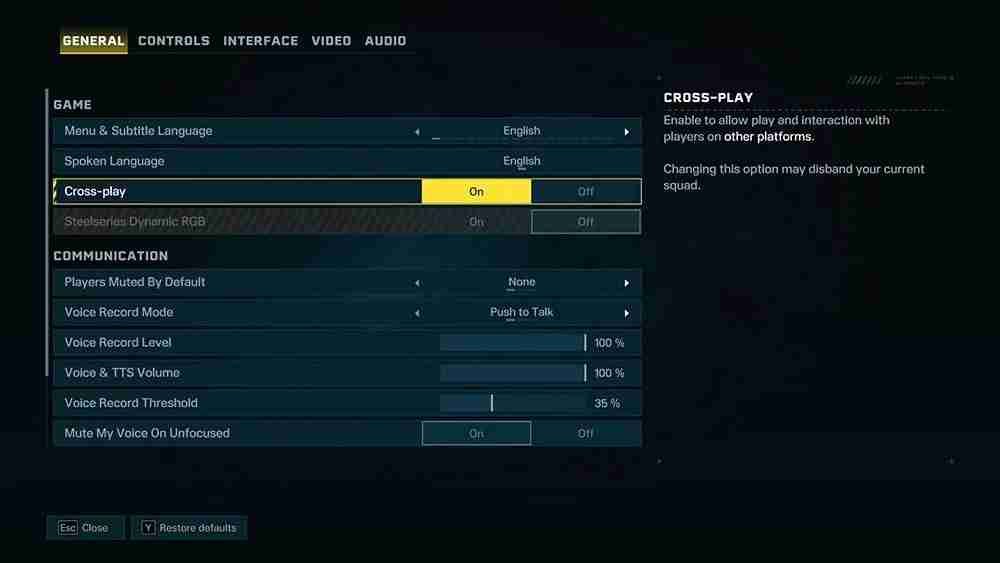
- Open options from the R6 main menu.
- Go to the General tab, and look for the setting called ‘Crossplay Matchmaking.’
- You can select any option as per your choice. There are three options, by the way: you have to select between PC and console, console-preferred, and OFF.
| Crossplay Setting | Matchmaking Details |
|---|---|
| PC and Consoles (ON) | You are entering into the PC matchmaking pool, where you have to play against other PC players. |
| Console Preferred | You will stay strictly with console-only players, where every player against you is playing on consoles (PlayStation or Xbox). |
| OFF | This means you lock your console-only matchmaking. If you are playing on PlayStation then you play against other PlayStation players. And if you are on Xbox then you play against only Xbox players. |
How to Link Your Ubisoft Accounts?
If you want to take proper advantage of this cross-progression and cross-save feature, you will need to link every console under the same Ubisoft account.
- Sign in to your ubisoft account on the official website.
- Go to the Account Information webpage and then go to the Linked Devices option.
- Each platform has a dedicated link button, you can click on whatever platform you play on.
- Use this same Ubisoft account to play the game whenever you want to play from any console you have, whether it’s PlayStation or Xbox.
Remember you have to link the consoles with the same Ubisoft account. That’s the only way to carry your progress with you when you switch to another console, PC to PS5 or Xbox or vice versa. Otherwise, you won’t get anything if you sign in with a secondary account. It just takes a few minutes to set up other consoles, all you have to do is click on the link button. After that, your data and account progress are completely safe across all platforms.
R6 Crossplay & Cross-Progression FAQs
Yes, R6 fully supports crossplay between PC and Xbox platforms, but with a hitch. If you are an Xbox player, you will be pulled into PC lobbies. Every opponent you face will likely have an advantage in aiming because of the mouse and keyboard.
Fortunately yes, Rainbow Six Siege supports crossplay between PC and PlayStation as well, and it’s the same as Xbox. PSN players will be placed into the PC matchmaking pool.
If you encounter any error while playing with any other console player, that doesn’t mean crossplay is not working. Sometimes it may happen because of R6 server glitches. Check if the Rainbow Six Siege servers are working or not if they are down, you have to wait, it’ll get fixed automatically don’t worry.